| AMIA ARCHIVE https://amiaworld.net/phpBB3/ |
|
| Shared Connections and Port Fowarding :: READ ME https://amiaworld.net/phpBB3/viewtopic.php?f=149&t=69583 |
Page 1 of 1 |
| Author: | MoshingChris [ Fri, Jan 18 2013, 17:02 PM ] |
| Post subject: | Shared Connections and Port Fowarding :: READ ME |
Hey guys, as some of you may have noticed Amia B has been broken a few times in the past couple of days. This is a result of people with shared connections, folk playing the game from two computers on the one router/connection not properly forwarding their ports. If a DM doesn't catch this prior to the server resetting it can cause major issues, including but not limited to the server not resetting correctly, or indeed not resetting and restarting at all. To avoid complications if you are sharing a connection then you must set your port forwarding correctly. To do this is fairly simple: On each of the computers sharing the connection you need to find out that PC's individual IP address within your network. A quick way to do this is Step 1: Go to your Start Menu -> Programs -> Accessories and open Command Prompt Alternatively in "search files and folders" type: cmd.exe Step 2: In the command prompt window type "ipconfig" and look for the line IPv4 address. . . . You want to copy down the number following IPv4 address That number should look something likes this 192.168.1.X (where the X is the number allocated to your computer by the router) Don't close your command prompt window yet Step 3: Open your web browser and access your router by typing in your routers IP address In the command prompt window this is the number following Default Gateway. . . . It will look something like this 192.168.1.1 Step 4: After accessing your router you need to locate Port Forwarding, often this is located under a routers advanced settings tab. Step 5: Create a new port fowarding which should bring up fields that are labelled in this fashion Quote: Service Name: External Port Start: External Port End: Server IP Address: Fill this out Example Quote: Service Name: Amia 1 External Port Start: 5121 External Port End: 5121 Server IP Address: One of the IP's you located in step 2 Step 6: Repeat step 5 with a few key differences Quote: Service Name: Amia 2 External Port Start: 5122 External Port End: 5122 Server IP Address: The other IP address you located in step 2 Step 7: Repeat step 5 for as many individual IP address' that share your connection and may play Amia/NwN online at the same time. It will save the DM's alot of trouble in the long run. If this was to hard to follow, theres a few tutorials on youtube about how to set your ports correctly. |
|
| Author: | NinjaClarinet [ Fri, Jan 18 2013, 23:05 PM ] |
| Post subject: | Re: Shared Connections and Port Fowarding :: READ ME |
To completely solve the issue, people on shared connections need to also open their "nwnplayer.ini" file. Scroll down to where it looks like: [Profile] ShowMessageOfTheDay=0 Client Port=5120 ShowPregenChars=1 JournalPage=1 Player Name=***** Email Address=***** ectectect Each computer needs to have Client Port= set to a unique number. All the port forwarding in the world won't help until that's done. |
|
| Author: | Gers [ Fri, Jan 18 2013, 23:42 PM ] |
| Post subject: | Re: Shared Connections and Port Fowarding :: READ ME |
Stickying this. Good info for shared connections. |
|
| Author: | P Three [ Fri, Feb 01 2013, 20:25 PM ] |
| Post subject: | Re: Shared Connections and Port Fowarding :: READ ME |
Having an issue with this as my husband's comp doesn't fit the 192.168.1.XXX model. What do i do? |
|
| Author: | NinjaClarinet [ Sat, Feb 02 2013, 1:26 AM ] |
| Post subject: | Re: Shared Connections and Port Fowarding :: READ ME |
That's not computer specific, but router specific (If you're using a router). Sometimes the gateway IP of a router can vary from the generic one Mosh posted. You can either find the documentation for the hardware where it'll be listed, or do this: Type in "CMD" in your start-run/search bar, that'll open a sort of fake DOS shell. Type in "ipconfig" in the window and hit enter. You'll get a readout on a bunch of connection information. (No quotes on anything when entering commands) You're looking for the number listed under "default gateway". That'll be what you need to enter to get into your router's firmware to do the port forwarding. It should look at least similar to what Mosh posted. (http://portforward.com/ is a good resource to have around) |
|
| Author: | P Three [ Sat, Feb 02 2013, 4:42 AM ] |
| Post subject: | Re: Shared Connections and Port Fowarding :: READ ME |
I did; the issue is that whereas the router wants it to look like "192.168.1.XXX", and will only let me enter the last 3 digits, the actual IPv4 reading is 192.168.33.135 or something, where I can't enter the 33, because the router is only set up to accept 192.168.1.(empty space here) |
|
| Author: | Naivatkal [ Sat, Feb 02 2013, 4:43 AM ] |
| Post subject: | Re: Shared Connections and Port Fowarding :: READ ME |
You check for a static IP being set in the TCP/IP settings? |
|
| Author: | MyOwnDestiny [ Wed, Apr 17 2013, 5:28 AM ] |
| Post subject: | Re: Shared Connections and Port Fowarding :: READ ME |
Alright.. well I was attempting to do this to reduce the lag on my end as well as help the server staff if my network was causing an issue. I could not locate and advanced settings in my router information. However, I did locate a section labeled "Virtual Servers". When I opened it, it looked similar to the layout posted but not exact... Quote: Description Inbound Port Type Private IP Address Private Port We are running three computers that all play NWN/Amia. Two are connected directly to the router and one is using a wireless connection. So... I filled it out like so.. Quote: Description: Amia1 Inbound Port: 5121 Type: TCP Private IP Address: 192.168.2.X (Hubby's comp) Private Port: 5121 Description: Amia2 Inbound Port: 5122 Type: TCP Private Address: 192.168.2.X (My comp) Private Port: 5122 Description: Amia3 Inbound Port: 5123 Type: TCP Private IP Address: 192.168.2.X (Wireless comp) Private Port: 5123 When applying changes, it did go through resetting the router and what not. It seems to have worked though I have yet to test it IG. Does this look right to those of you computer savvy folks out there? Thanks for the help BTW! MOD |
|
| Author: | Jes [ Wed, Apr 17 2013, 12:30 PM ] |
| Post subject: | Re: Shared Connections and Port Fowarding :: READ ME |
I think that looks fine. Don't forget to make sure this is done, too. This is the most important part, from my experience! NinjaClarinet wrote: To completely solve the issue, people on shared connections need to also open their "nwnplayer.ini" file. Scroll down to where it looks like:
[Profile] ShowMessageOfTheDay=0 Client Port=5120 ShowPregenChars=1 JournalPage=1 Player Name=***** Email Address=***** ectectect Each computer needs to have Client Port= set to a unique number. All the port forwarding in the world won't help until that's done. |
|
| Author: | MyOwnDestiny [ Thu, Apr 18 2013, 0:36 AM ] |
| Post subject: | Re: Shared Connections and Port Fowarding :: READ ME |
Jes wrote: I think that looks fine. Don't forget to make sure this is done, too. This is the most important part, from my experience! NinjaClarinet wrote: To completely solve the issue, people on shared connections need to also open their "nwnplayer.ini" file. Scroll down to where it looks like: [Profile] ShowMessageOfTheDay=0 Client Port=5120 ShowPregenChars=1 JournalPage=1 Player Name=***** Email Address=***** ectectect Each computer needs to have Client Port= set to a unique number. All the port forwarding in the world won't help until that's done. Yes this was done first. It was easy enough to accomplish so I didn't have any questions about it. Thank you! MOD |
|
| Author: | McGondy [ Sat, May 11 2013, 8:32 AM ] |
| Post subject: | Re: Shared Connections and Port Fowarding :: READ ME |
Is this required for simultaneous play only? I use my desktop mostly, but sometimes I use my laptop when I'm having a lazy day |
|
| Author: | NinjaClarinet [ Sat, May 11 2013, 8:47 AM ] |
| Post subject: | Re: Shared Connections and Port Fowarding :: READ ME |
Yes, only required for simultaneous logins. You're fine otherwise. |
|
| Author: | Herr Delta Houdini [ Tue, Mar 10 2015, 20:52 PM ] |
| Post subject: | Re: Shared Connections and Port Fowarding :: READ ME |
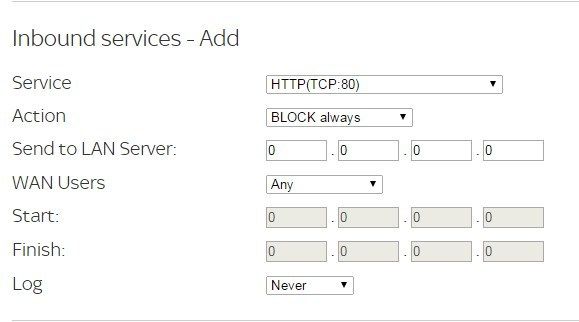
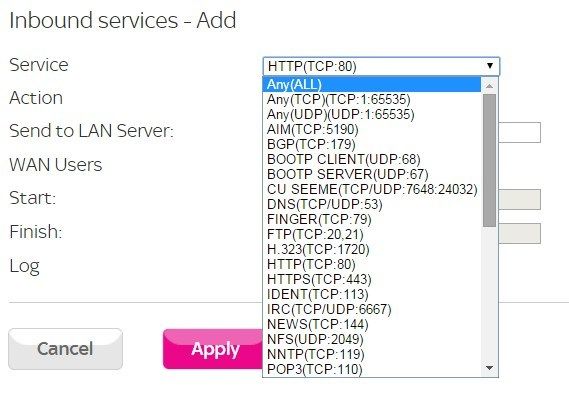
Having a little trouble understanding how the current router I have works with port forwarding and today my connection to Amia specifically is quite unstable. Help would be much appreciated ![]() ![]() There is also an "Outbound" which is identical to the above. |
|
| Page 1 of 1 | All times are UTC |
| Powered by phpBB® Forum Software © phpBB Group http://www.phpbb.com/ |
|